Run your joinery shop from one board.

Every job, every item and every hour, from the first drawing to the last install. The office and the factory look at the same thing, so nothing gets cut before it’s right.

14 days free, no card needed. Then $149 a month for the whole shop, including GST.

I draw shop drawings for joinery shops in Sydney.

I’m Matty. My day job is drawing shop drawings and CNC files for commercial joinery shops around Sydney, so I see a lot of jobs from the inside.

On nearly every one, the same things go wrong. An RFI nobody answered. A fridge that doesn’t fit the bay. A kitchen sent to the CNC before the client signed the drawings. Nobody’s being careless – the information just lives in too many places.

LignaFlow is the board I wanted every shop I work with to have.

Matty · Founder, LignaFlow

Watch one job go from drawings to install in under four minutes.

Set up the company, clear the holds, build it, pack it, scan it on site and send the hours to accounts. Turn the sound on.

The expensive mistakes happen between the office and the floor.

The fridge bay was cut 30 mm short.The appliance spec was never checked, and nobody knew the designer still hadn’t answered the RFI.

The stone tops were “coming Thursday”.So the install crew got booked and the client got told, and then it turned out the template was never done.

Dave’s off sick and the edgebander’s down.And the only plan for the week is in the foreman’s head and on a whiteboard nobody has updated.

Here’s what it does.

These are screenshots of the real app, with a made-up joinery shop in it.

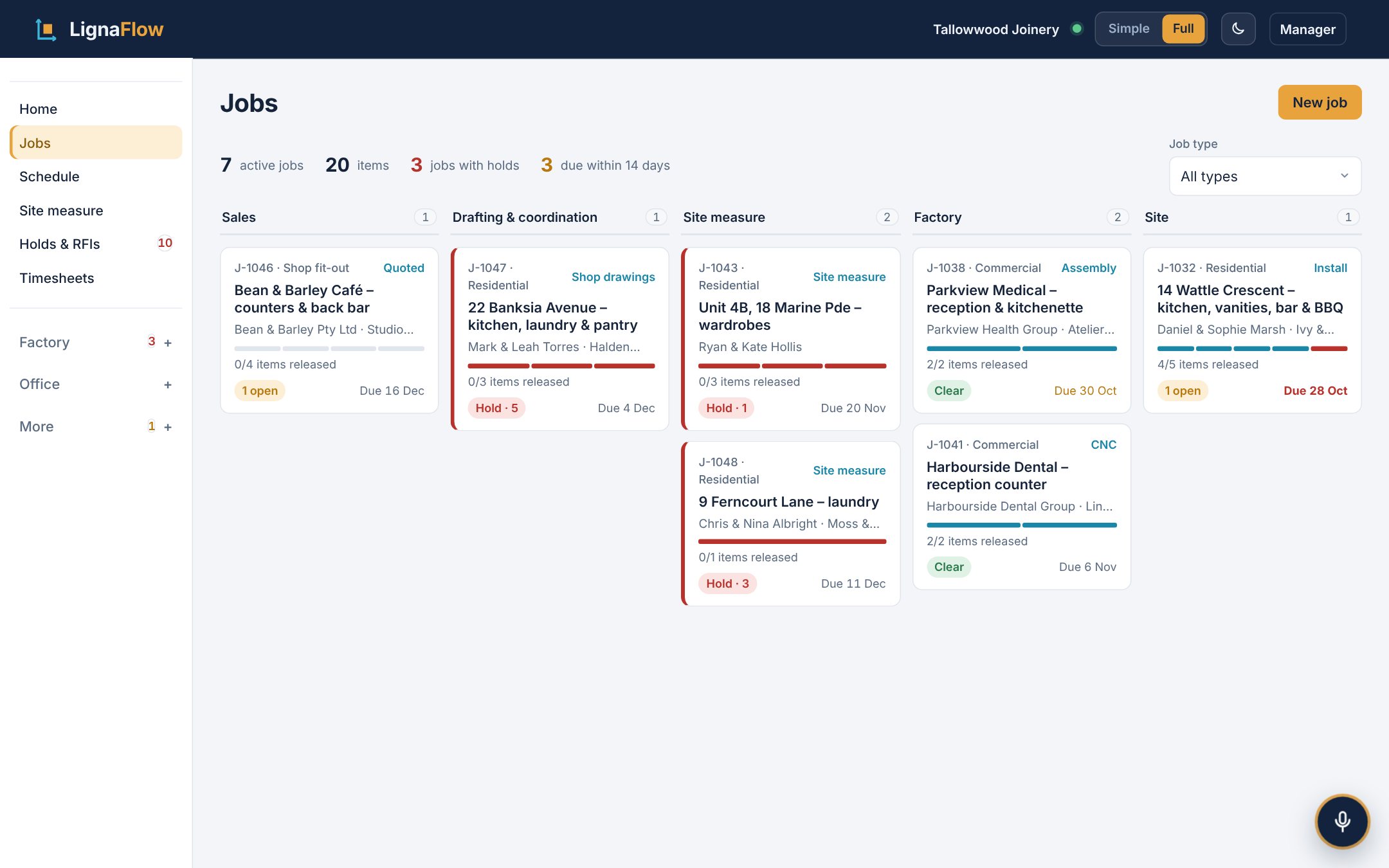
The jobs board in LignaFlow: job cards in columns from Sales through Drafting, Site measure, Factory and Site, each showing its holds and items released

Every job, broken into the joinery you actually build.

A house is a kitchen, two vanities, a bar and a BBQ. A shop fit-out is counters, a back bar and panelling. Each item moves through the shop on its own, and you drag jobs between stages on the board.

  • One panel per job with its holds, drawings, variations and work orders
  • Import all your current jobs from Excel in one go
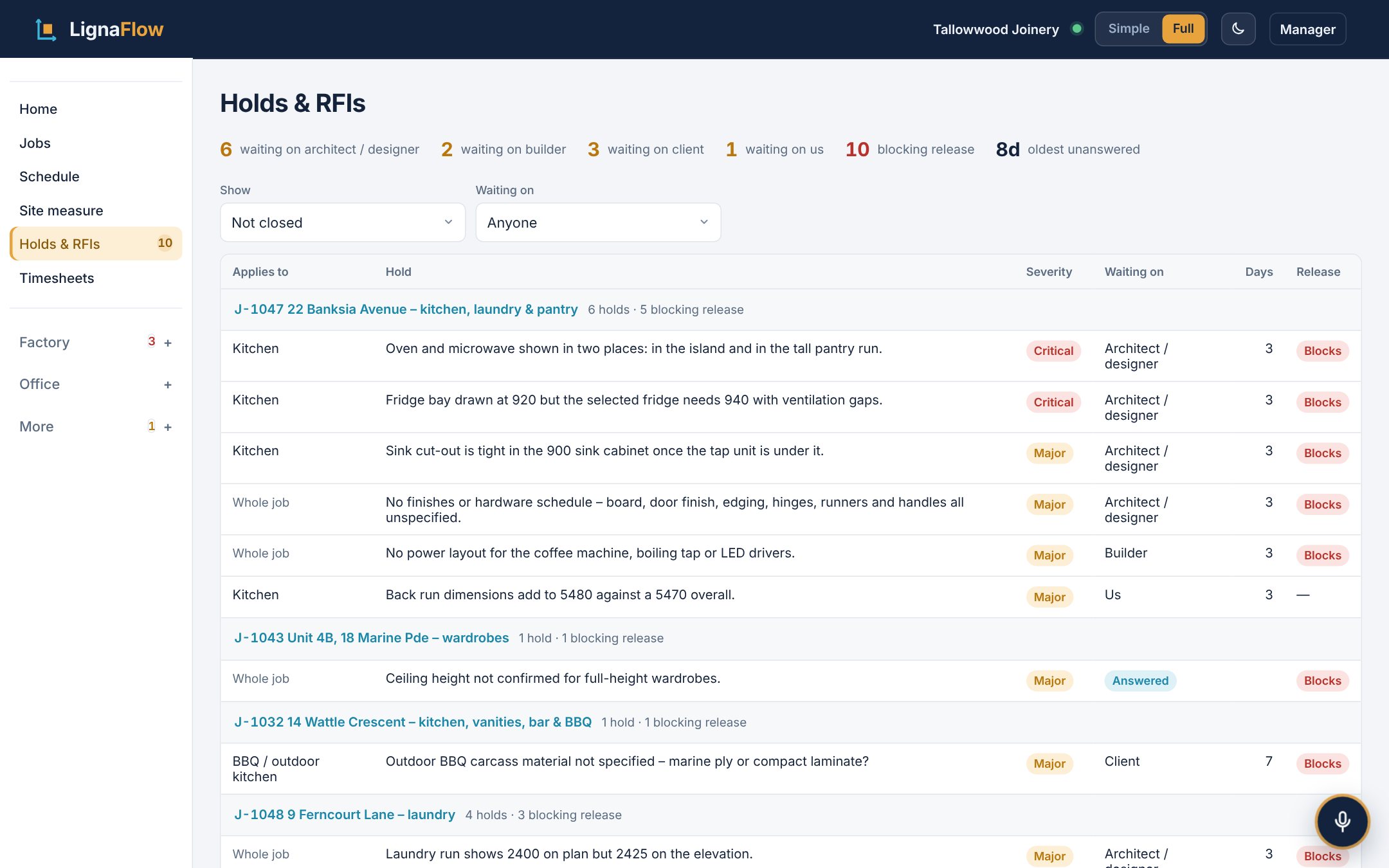
Holds and RFIs list showing each open question, which job it is on, who it is waiting on and for how many days

Nothing goes to the CNC until it’s right.

An item can’t be released to the factory while a hold is open, the drawings aren’t approved, an appliance hasn’t been checked or a variation isn’t signed. You can see every open question, who it’s waiting on and for how long.

  • Copy the RFI email in one click
  • You choose which checks your shop switches on
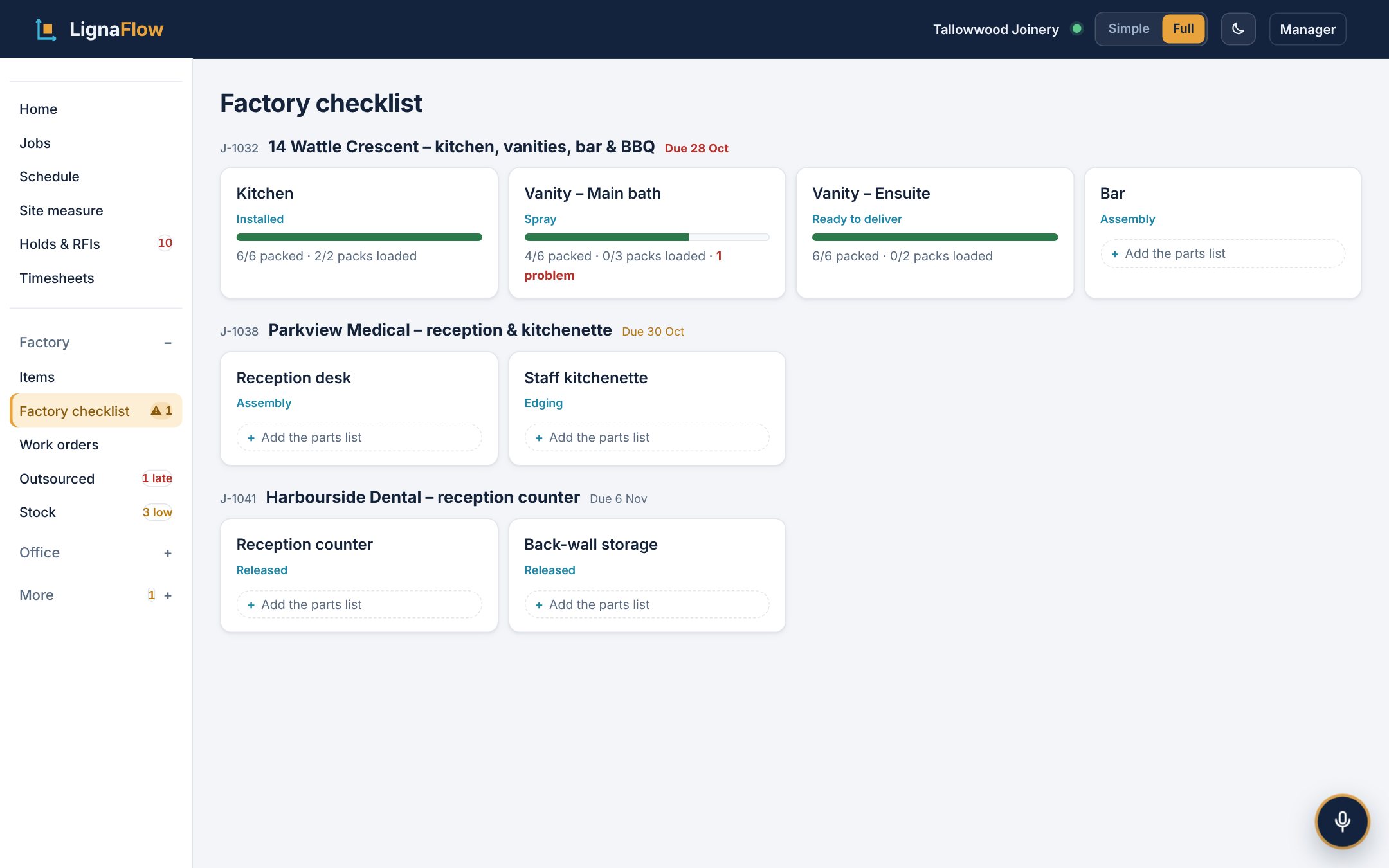
Factory checklist for a kitchen: every part listed by room with ticks for made, QC checked and packed into numbered packs

Every part made, checked and packed before the truck leaves.

Paste in the cut list or the Microvellum parts report for each room. The guys tick each part as it’s made, checked and packed. An item can’t go to Ready to deliver until every part is in a pack.

  • Pack and part labels with a QR code on each
  • A problem logged on a part shows up everywhere
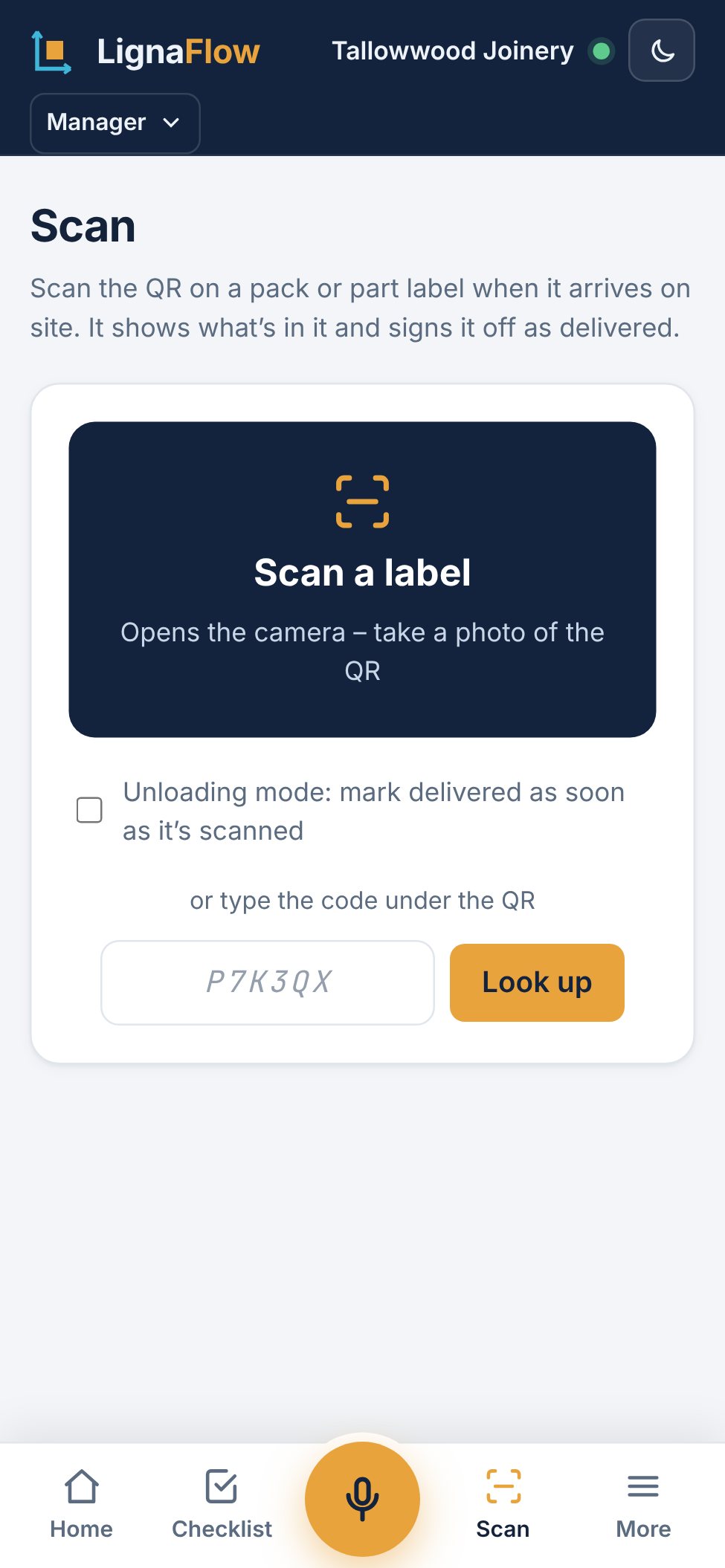
A phone showing a scanned pack label: Pack 3 of 4 delivered to the right job, with what is still to come

On site, they scan the pack and it says delivered or not yet.

The install crew scans the label with their phone. LignaFlow shows what’s in the pack, who received it and what’s still to come. It checks the phone’s location, so a pack can’t be signed off at the wrong job.

  • Items can’t be marked installed until every pack is there
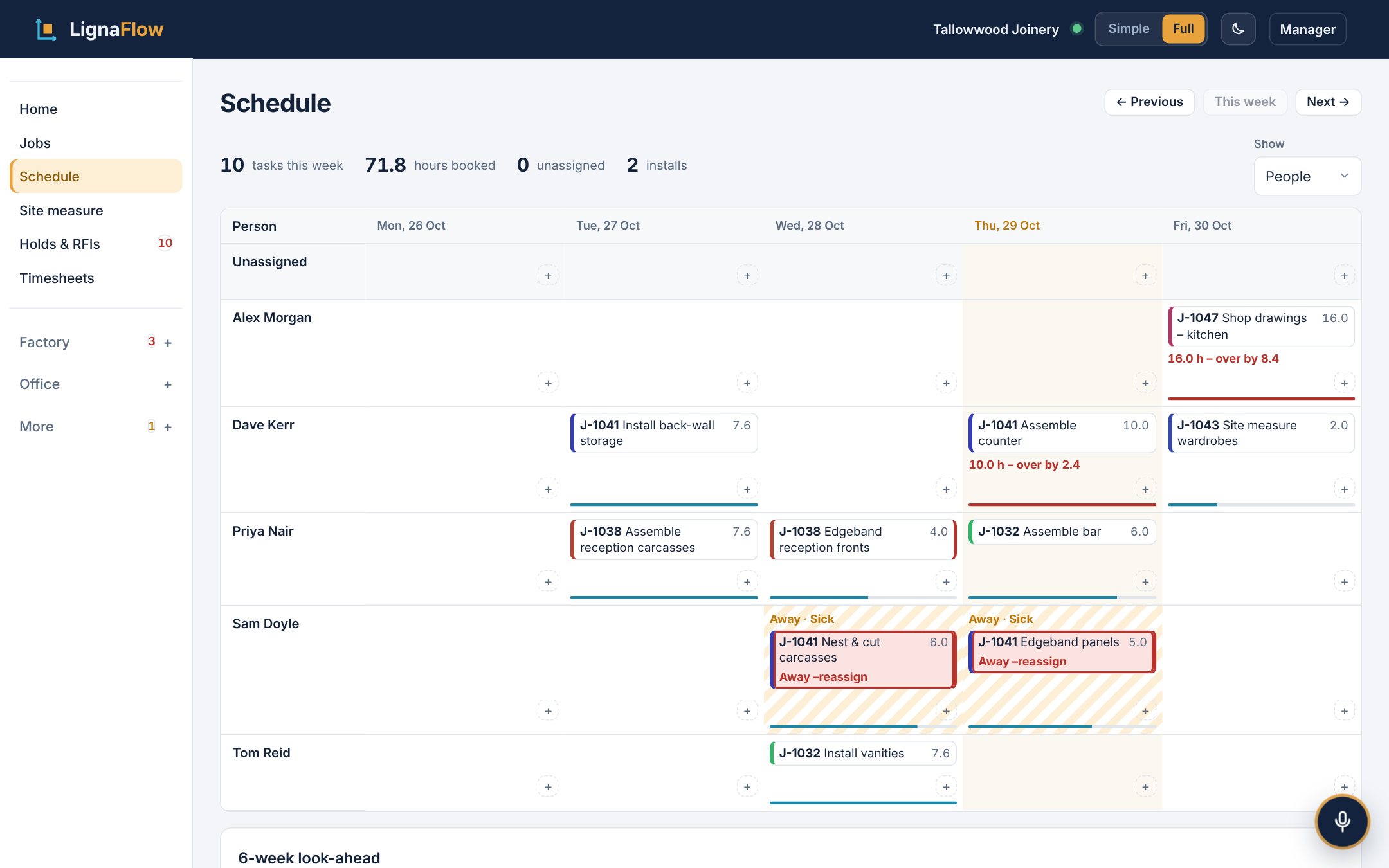
Weekly schedule with each person’s work by day, over-booked days marked in red

A week you can drag around, and a plan B when it goes wrong.

See who’s on what every day and drag work between people. When someone’s away or a machine goes down, LignaFlow shows what’s affected and who else can do it.

  • Work orders for cutting, edging, assembly and QC
  • Six weeks ahead: site dates, installs and work orders
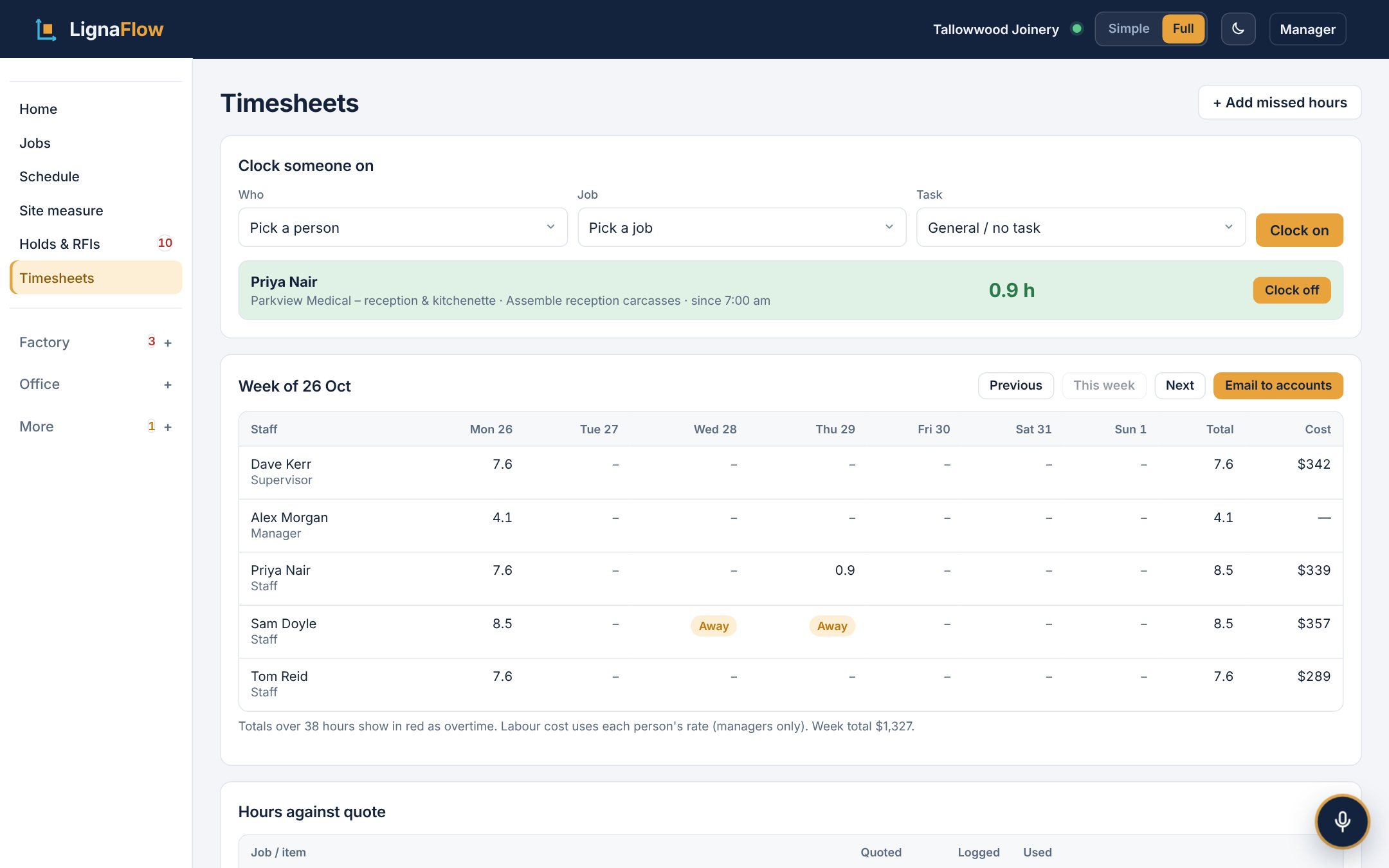
Timesheets for the week with hours per person per day and the cost of each job against its quote

Hours go to the job, and the week’s timesheets go to accounts.

People clock on to a job from their phone or the workshop screen. At the end of the week, one button emails accounts a summary for everyone, from your own Outlook. You can see hours against the quote on every job.

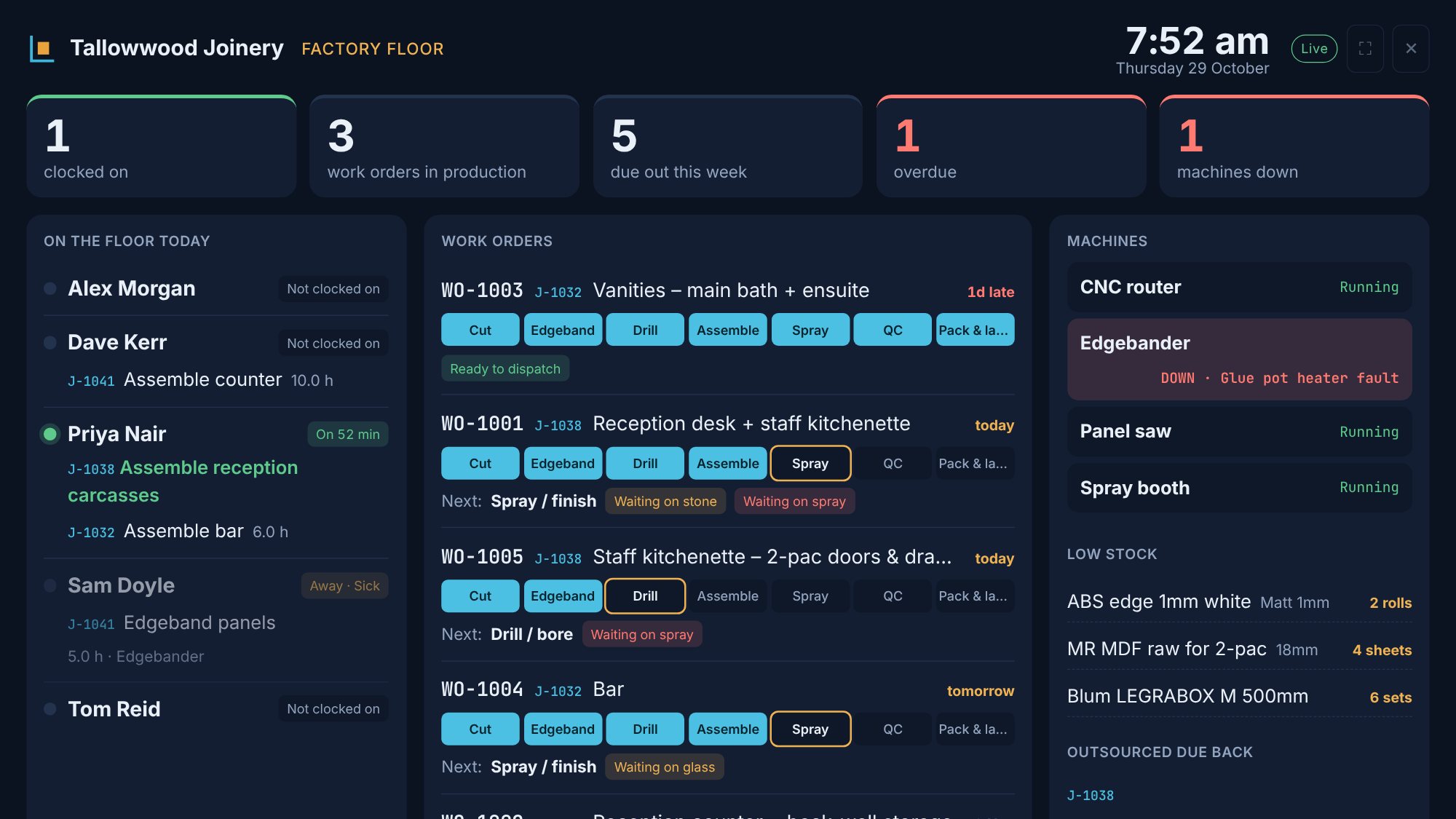
Factory floor screen on a TV: who is clocked on, today’s work orders and which machines are running

Put it on a TV in the workshop.

Big, live screens for the factory floor, the drawing office and dispatch, and a clock-on station by the door: tap your name, tap the job, and you’re on.

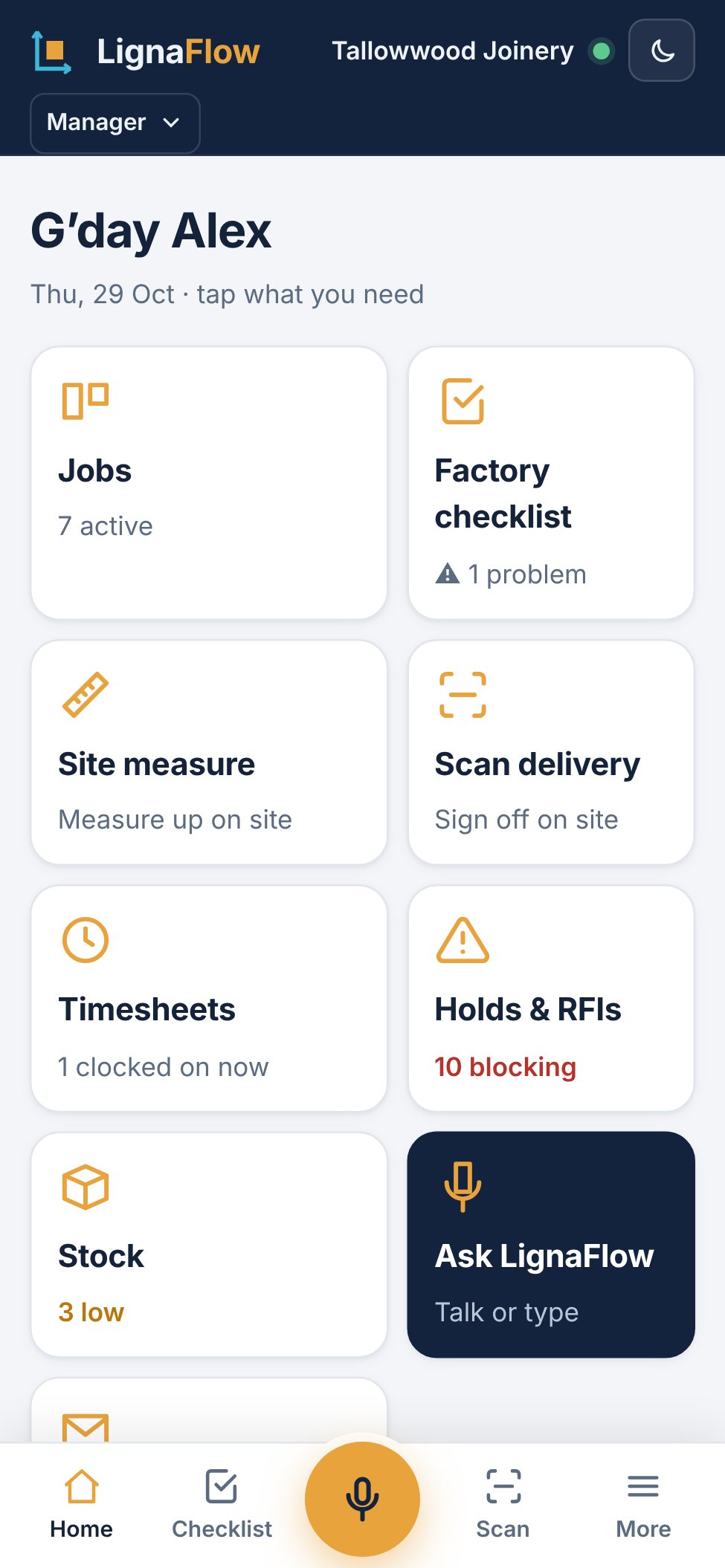
LignaFlow in Simple mode on a phone: large buttons for Jobs, Checklist and Scan, and a Today list

Simple on the phone, everything on the desk.

On a phone or iPad it opens with big buttons for the everyday jobs and a Today list of what needs you. Staff get a one-tap clock on. On the desk you get every feature.

It also does these.

  • Site measuresSizes, photos with notes on every power point and pipe, and the site checklist, on your phone.
  • Drawing registerRevisions, approval status and transmittals, with the cover email written for you.
  • VariationsPriced from hours, materials and margin. Unapproved changes can’t be built.
  • Appliance checksOvens, fridges, sinks and taps checked against the cabinet before anything is cut.
  • Outsourced workStone, spray, glass and steel tracked until it’s back, with late items in red.
  • StockBoard, edging and hardware with minimum levels and a reorder list.
  • ReportsHours against quote, overtime, on-time delivery, RFIs by designer and downtime.
  • Ask LignaFlowTalk or type: “What’s holding up Banksia Avenue?” It looks it up or makes the change.
  • Managers and staffManagers see rates, costs and settings. Staff see their own work.
  • Your own setupYour logo, job numbers, working week, skills and job types.

You can try it before you sign up.

The demo is the real app with a made-up joinery shop in it. Open a job, raise a hold, tick off the factory checklist. Nothing you do is saved.

Open the demo
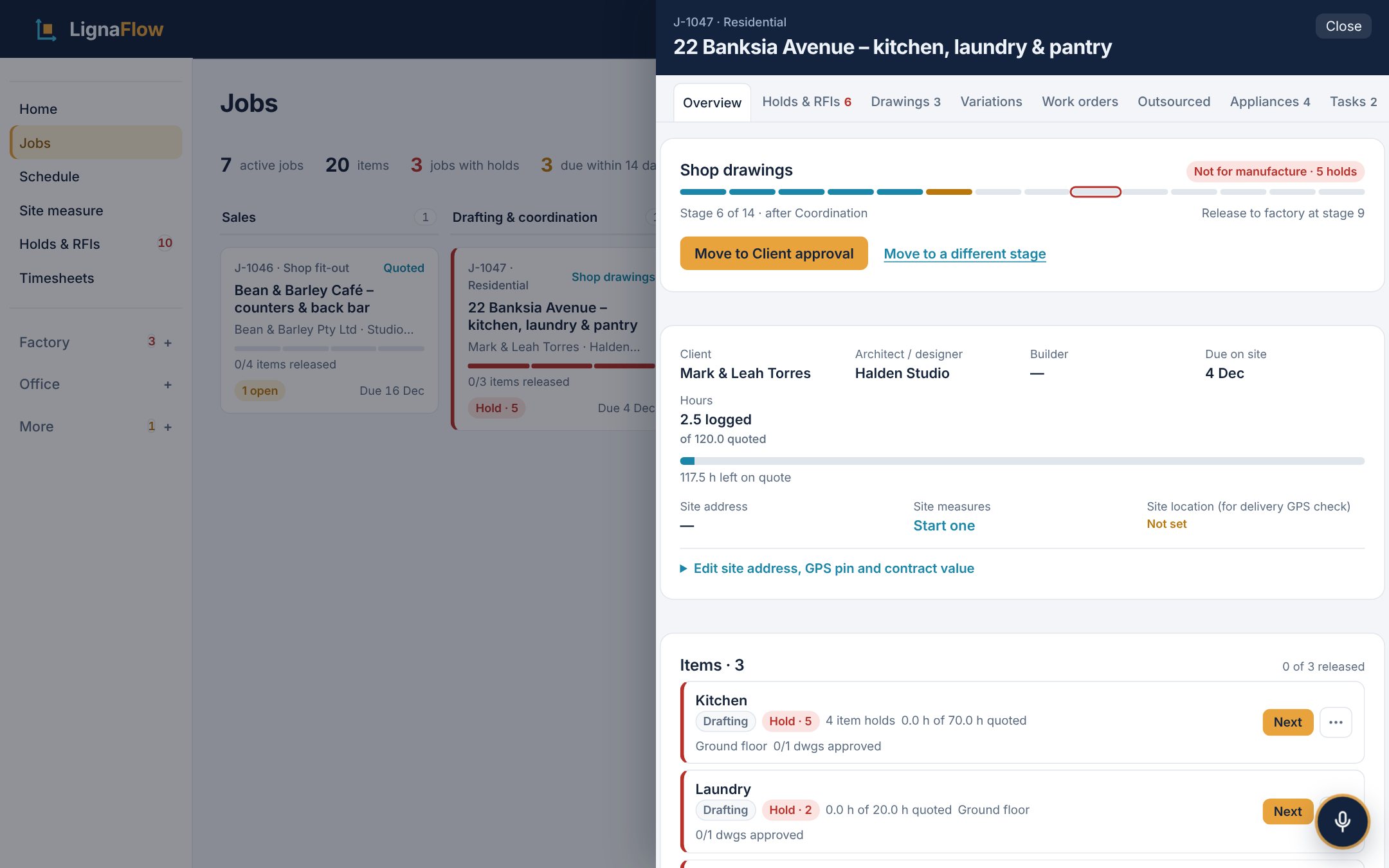
A job open in the demo: its stage, release check, items and open holds

It’s one price for the whole shop.

$149 a month, AUD including GST

Start with a 14-day free trial. You don’t need a card.

  • As many jobs, staff and devices as you like
  • Every feature on this page, with no tiers
  • No per-user fees, cancel any time
  1. You sign up.Set it up in your own time. No card, and the trial clock isn’t running yet.
  2. You start the trial when you’re ready.Once your company, a staff member and a job are in, we ask if you want to start. If you never do, it starts 30 days after sign-up.
  3. Fourteen days later the trial ends.Add a card whenever you like. The first $149 is taken the day the trial ends, never before.
  4. No card? It goes read-only.Nothing is deleted. Everyone can still see and download every job.

Questions people ask.

When does my free trial start and end?

When you choose. Once your company details, one staff member and one real job are in, LignaFlow asks if you’d like to start your 14-day trial. Say not yet, and a Start free trial button waits in the header until you’re ready. If you never start it, it starts by itself 30 days after you sign up. It ends 14 days after it starts, and the app shows the end date the whole way through. You don’t need a card to start.

When am I first charged?

Not before your trial ends. If you subscribe during the trial, the first $149 is taken on the day the trial would have ended, then on that date each month.

Does $149 include GST?

Yes. It’s in Australian dollars and includes GST. Every invoice can be downloaded from Plan & billing.

What happens if I don’t subscribe?

Your account goes read-only. Nothing is deleted, and everyone can still open and export every job. Subscribe and you can make changes again straight away.

Is it really one price for the whole shop?

Yes. $149 a month covers your company: as many jobs, staff and devices as you like, and every feature. There are no per-user fees.

What do I need to run it?

A web browser. Phones and iPads open in Simple mode, computers in Full mode, and a TV in the workshop can show the kiosk screens. There’s nothing to install.

How do my staff get in?

You send them an invite from Team access. They make a login and land straight on your board. You choose who’s a manager and who’s staff: staff can clock on, tick checklists and raise holds, but can’t change jobs or see pay rates.

Can I bring in the jobs I already have?

Yes. Download the Excel template from the Jobs page, put in one row per job (and its items if you like), and import it. You can also upload your own job list – columns like Job no., Client and Due date are matched for you.

Can I cancel any time?

Yes, from Plan & billing, where you can also change your card and download invoices. You keep full access until the end of the month you’ve paid for, then the account goes read-only.

Where is my data kept, and is it backed up?

In a managed PostgreSQL database run by our hosting provider, Railway, sent over HTTPS and kept separate from every other shop. Owners and managers can download everything as one file from Settings → Access & data at any time, so you always have your own copy. The privacy policy has the details.